Author: M Abo Bakar Aslam
Tables
HTML tables are used to organize and present data in a structured format using rows and columns. In this section, you will learn how to create tables using essential elements and understand the importance of proper structure with tags like <thead> and <tbody>. These practices ensure better readability, maintainability, and compatibility with modern web development frameworks.
1. How to create table
The most common and recommended method for creating tables is by using the <table> element. A table is defined using this element, and the table structure is organized with nested elements like <tr> (table row), <th> (table header cell), and <td> (table data cell).
2. Suggestion
In following code, we used <thead> and <tbody>. These can be removed when you are working in simple HTML, but these are mandatory in case of modern framework like JavaScript's frameworks.
a. If you don’t use them, then a error will only be generated in the modern frameworks (due to unstructured table). But simple HTML will not throw the error.
b. If you use them in simple HTML, then HTML will also work fine. Therefore, it is suggested use them in your all layouts.
3. Example Code
<table>
  <thead> <!--Can be remove for simple HTML, but not in react-->>
    <tr> <!--Heading row-->>
        <th>Header 1</th>
        <th>Header 2</th>
        <th>Header 3</th>
    </tr>
  </thead>
  <tbody> <!--Can be remove for simple HTML, but not in react-->>
    <tr> <!--First row-->>
        <td>Data 1</td>
        <td>Data 2</td>
        <td>Data 3</td>
    </tr>
    <tr><!--Second row-->
      <td>Data 1</td>
      <td>Data 2</td>
      <td>Data 3</td>
    </tr>
    <tr><!--Third row-->
      <td>Data 1</td>
      <td>Data 2</td>
      <td>Data 3</td>
    </tr>
  </tbody>
</table>
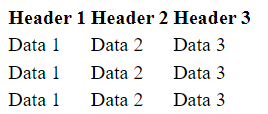
Output