Author: M Abo Bakar Aslam
Basic Structure and Run Code
Here, we introduce the fundamental structure of an HTML document, explaining the purpose of key elements such as <!DOCTYPE>, <html>, <head>, <title>, and <body>. It also provides a simple example to demonstrate how these elements work together, along with step-by-step instructions to create and run an HTML file in a web browser.
Essential Components
Here’s a concise outline of the essential components of an HTML document. section contains the visible content that users will see when they visit your web page.
1. <!DOCTYPE> Declaration:
The <!DOCTYPE> declaration is the first line of an HTML document. It specifies the HTML version being used. For modern web development, you should use the HTML5 declaration: <!DOCTYPE html>
2. <html> Element:
The <html> element serves as the root element of the HTML document. All other elements are enclosed within it.
3. <head> Element:
Inside the <html> element, the <head> element contains metadata and information about the document. This includes the title of the page, character encoding, and links to external resources like stylesheets and scripts.
4. <title> Element:
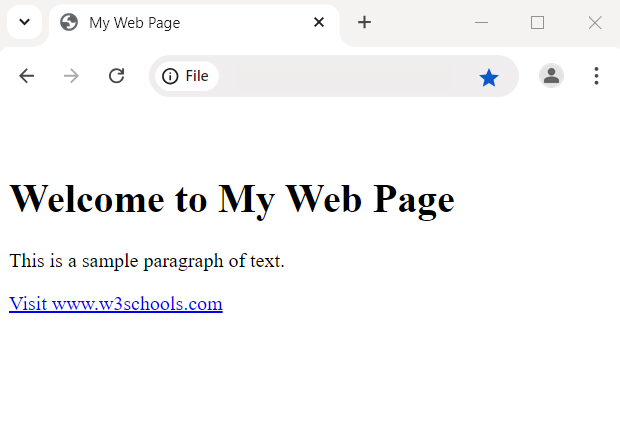
Inside the <head> section, the <title> element defines the title of the web page, which appears in the browser’s title bar or tab.
5. <body> Element:
The <body> element contains the main content of the web page, including text, images, links, and other elements that are visible to the user.
Example 1:
Here's a basic HTML template that puts these elements together.
<!--File: myHTMLFile.html-->
<!DOCTYPE html>

<html>
    <head>
        <title>My Web Page</title>
    </head>
    <body>
        <!-- Your web page content goes here -->
        <h1>Welcome to My Web Page</h1>
        <p>This is a sample paragraph of text.</p>
        <a href="https://www.w3schools.com">Visit www.w3schools.com</a>
        <!-- Add more content as needed -->
    </body>
</html>
How to Run the Code
Do following steps in sequence.
- Open any text editor
- Paste above code
- Save the file by setting some name and with extension
.html - Open the file with any browser
Output